Light and dark mode
A diagram drawn on white becomes a bright slab in a dark theme. InvertLuminance turns light into
dark and dark into light, but keeps the hues: the blue bars below are still blue.
var darkVariant = new FileAdjustmentImage {
    InvertLuminance = true,
    RequestedFormat = FileFormat.Png
};

string url = db.GetUrl(asset.File, darkVariant);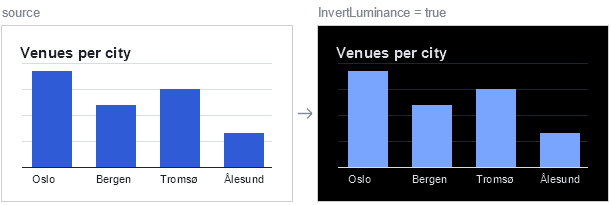
AutoLightDarkMode lets the converter decide. It inverts only when that is likely to look better:
var forDarkTheme = new FileAdjustmentImage {
    AutoLightDarkMode = AutoLightDarkSwitch.AdaptToDarkModeIfNeeded
};| Value | Effect |
|---|---|
None |
No change. |
AdaptToLightModeIfNeeded |
Invert if the image looks made for a dark surface. |
AdaptToDarkModeIfNeeded |
Invert if the image looks made for a light surface. |
It inverts only flat artwork, such as logos, icons, diagrams and screenshots, never a photograph, and
leaves an image alone when unsure. The two options are independent: InvertLuminance = false does
not stop AutoLightDarkMode. Both are applied before the tone options. A light and a dark variant
are two URLs, so a <picture> element can let the browser choose:
<picture>
    <source media="(prefers-color-scheme: dark)" srcset="@db.GetUrl(asset.File, forDarkTheme)">
    <img src="@db.GetUrl(asset.File)" alt="Seating plan">
</picture>